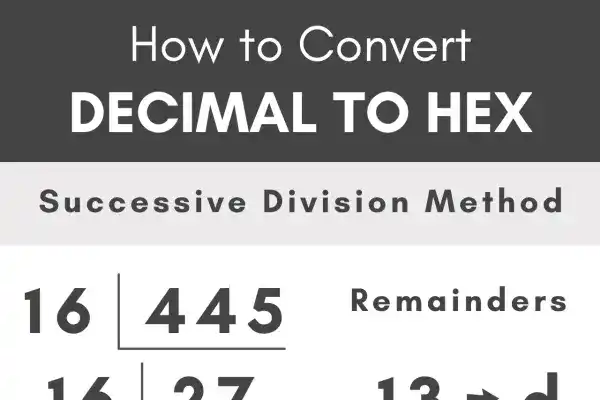
Working with numeric systems like binary and hexadecimal is common in programming, hardware design, networking, and web development. Yet converting decimal values to hexadecimal manually or via complex software can be time-consuming and error-prone.
That’s where the Decimal to HEX Converter comes in. It’s a free, web-based tool designed to convert decimal integers into hexadecimal (and binary) in real time — with support for endianness, byte padding, digit grouping, and step-by-step breakdowns.
Whether you’re a student learning number systems, a software developer working with memory layouts, or a cybersecurity professional decoding payloads, this tool is for you.
Who Should Use This Converter?
This online converter is crafted for a wide variety of users:
-
Software developers working on low-level systems, firmware, or data processing
-
Embedded engineers dealing with microcontrollers, hardware registers, and bitwise logic
-
Web developers & designers converting decimal color values to hex codes for CSS
-
Computer science students studying base-10, base-16, and base-2 representations
-
Network and security analysts who review and interpret hex-based packet data or memory dumps
Anyone who routinely switches between decimal and hexadecimal values will benefit from the Decimal to HEX Converter.
Why This Tool Stands Out
Unlike generic base converters, this tool offers advanced functionality while staying user-friendly. Here’s what makes it a must-have:
 Instant Conversion
 Instant Conversion
No delays — as soon as you hit “Convert,” your decimal is displayed in both hex and binary.
Byte Length Customization
 Byte Length Customization
Choose how many bytes to pad your output: 1, 2, 4, or 8 bytes. For example, decimal 255 with 4 bytes becomes 000000FF.
Endian Display
 Endian Display
View both little-endian and big-endian representations. This is vital when working with memory-mapped registers, networking, or assembly-level code.
Step-by-Step Explanation
 Step-by-Step Explanation
Curious about how decimal becomes hex? The tool walks you through each division and remainder step so you can learn while you convert.
Digit Grouping
 Digit Grouping
Enable this option to separate long hex or binary strings into readable blocks (e.g., 00 00 00 FF), ideal for debugging or documentation.
How to Use the Decimal to HEX Converter
Using this tool is simple:
-
Enter a decimal number — any non-negative integer.
-
Select a byte length — 1, 2, 4, or 8 bytes depending on your use case.
-
Click Convert — instantly see:
-
Hexadecimal value
-
Binary value
-
Byte-aligned endian tables
-
Visual conversion steps
-
-
Toggle digit grouping (optional) for better formatting.
-
Use Reset to start over with a new input.
The interface is mobile-friendly and clutter-free, designed to save you time and reduce errors.
Real-World Use Cases
Embedded Development
 Embedded Development
Microcontrollers often use little-endian memory layouts. This tool lets you confirm your register mappings match expected output.
Network Protocol Debugging
 Network Protocol Debugging
Networking tools often show hex values for header data. Convert decimal addresses or IDs into hex to interpret packet content.
Web Design
 Web Design
When specifying colors in CSS or SVG, convert RGB decimal values into their hex equivalents (e.g., 255, 255, 255 → #FFFFFF).
Low-Level Debugging
 Low-Level Debugging
In reverse engineering, working with disassembled code, or analyzing raw memory, the Decimal to HEX Converter helps convert addresses and opcodes cleanly.
Cybersecurity and Forensics
 Cybersecurity and Forensics
Use the converter to decode hex-based payloads or reconstruct original decimal values from hex dumps during malware analysis.
How It Helps Technical SEO
Though it’s not a content SEO tool, this converter plays a supporting role in technical SEO tasks:
-
Ensures correct hex formatting in CSS, JavaScript, or structured data
-
Assists in debugging hex-encoded tracking links or analytics payloads
-
Prevents formatting errors in minified scripts or microdata
-
Supports hex-to-decimal validation in schema or web markup
Clean, error-free code leads to fewer crawl errors, better rendering, and ultimately, improved search visibility.
Why It’s Better Than Other Tools
Many online converters offer only basic features. This Decimal to HEX Converter includes:
-
Instant output
-
Educational step-by-step view
-
Endian support
-
Byte selection
-
Readability features like digit grouping
-
Responsive design, no ads, no popups
 Instant output
 Educational step-by-step view
 Responsive design, no ads, no popups
It’s built for professionals who need more than just a number converter — they need reliability, clarity, and control.
Try These Related Tools Too
Explore more conversion tools that complement the Decimal to HEX Converter in your workflow:
-
Convert hex to decimal format with ease
-
Decode encoded hex text using the Hex to Text Tool
-
Convert hexadecimal to octal via the Hex to Octal Converter
-
Convert structured data with the JSON to CSV Converter
-
Simplify JSON data using the JSON to Text Converter


Final Thoughts
The Decimal to HEX Converter is more than a utility — it’s a time-saving, educational, and reliable tool for both beginners and experts. Whether you’re building embedded firmware, writing CSS styles, or analyzing network packets, having this converter bookmarked gives you speed, accuracy, and insight.
Use it once, and it’ll become a core part of your daily tech toolkit.